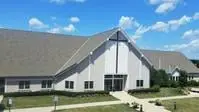
A Legacy of Faith Since 1867
From humble beginnings as St. Martin’s to a growing, vibrant church in Hartland, our story is rooted in faith, community, and God’s enduring presence.
About Our Savior’s Lutheran Church
Our Savior’s Lutheran Church has been a beacon of faith in Hartland since 1867, even before the village was established. Beginning as St. Martin’s, early members gathered near what is now Capitol Drive, worshiping in multiple languages and building a strong foundation of community. Renamed in 1935, Our Savior’s continues to grow—expanding ministries, embracing new spaces, and faithfully serving a changing world.
A Church That Moves Forward
From the moment we dedicated our new church in 1999…to the launch of our digital campus in 2020…to the creation of sacred spaces for worship and remembrance…Our Savior’s continues to grow, adapt, and serve—always anchored in faith and driven by God’s immeasurable love.
Who We Are Today
Today, Our Savior’s is a vibrant and welcoming congregation that blends tradition with innovation. At the center of our community lies worship, enriched by music, technology, and profound connections that lift one another.Lorem ipsum dolor sit amet, consectetur adipiscing elit. Ut elit tellus, luctus nec ullamcorper mattis, pulvinar dapibus leo.
What We Are Passionate About
Worship & Music – A vibrant music ministry featuring Praise Singers, Sacred Sisters, handbells, praise band, and meaningful liturgical experiences
Outreach & Service – Actively serving our community through partnerships with The McGuire Foundation, Hope Center, Hartland Food Pantry, and Loaves & Fishes
A Legacy of Growth 1867–1917 | Foundations of Faith
The first gathering was held on May 5, 1867, and by 1868, a church was built as St. Martin’s. Worship was offered in English, German, and Danish, reflecting the rich cultural roots of the congregation. With the installation of the first resident pastor in 1871, the church continued to grow—shaped by faith, heritage, and a strong sense of community.
1918–1967 | Unity and Expansion
By 1931, the congregation transitioned to English-only services, reflecting a new era of unity and accessibility. In 1935, the church was renamed Our Savior’s Evangelical Lutheran Church. During this time, vibrant choirs, youth programs, and ministry groups took root, and the church was remodeled to support a growing and active congregation.
1968–Present | A Living Church
The iconic “Round Church” was dedicated in 1971 at Hwy K & North Ave, marking a bold step in the congregation’s journey. In 1999, Our Savior’s moved into its current church home, continuing to grow and evolve. With ongoing investment in worship, music, and technology, the church expanded its reach through the launch of a digital campus in 2020, followed by the addition of an outdoor worship pavilion in 2021 and the creation of a Scatter Garden in 2022.
Join Us
Whether you’re new to our community, seeking spiritual growth, or searching for a place to call home…you are welcome here.